
PK Tip: Using Keywords and Titles for Effective Search
In Personal Knowbase, you can use an article's keywords, title, and date fields as tools to more easily and quickly search your data file with the Find command (from the Edit menu). Here are some suggestions:
Putting key information in articles' titles allows you to considerably speed up Find by using its Title Text Only option.
Using the article date field to accurately reflect the date of the article's data also allows you to limit the set of articles searched.
Selecting keywords in the Index Window allows you to reduce the set of articles to search by using Find with the Search Range of Selected Articles.
For example, I use a Personal Knowbase data file to catalog my digital photographs. I use a single article to list the photos I take for a one day. I follow these conventions:
The date field is for the day I took the photos. I have turned off the Automatically Update Article Dates setting in File Properties (from the File menu) for this file so that I can't accidentally change the article date if I edit the article later.
Each article's title includes the location(s) where all photos were taken that day. I chose not to make a keyword for each location, since I take photos at many locations, and I don't want to have a large number of keywords which are associated with only a single article each.
Keywords for the data file include anything that I foresee someday wanting to locate photos about, except for dates and locations. These include topics like butterfly, bird, bridge, lake, lighthouse, family, architecture, specific names for people and pets who are frequently photographed, and so on.
Locating specific photos is fairly easy. If I'm looking for photos from a trip, I search within the date range of the trip. If I need photos of a type of object, I use keyword selection in the Index Window. For photos of a location, I do a Find on the location name using Find's Title Text Only option.
To find photos of butterflies taken at Point Reyes National Seashore in 2018, I move the butterfly keyword to the Index Window's Selected column and run a Find on the Find What string Reyes with the Title Text Only option, a Search Range of Selected Articles, and a date range of Jan. 1, 2018, to Dec. 31, 2018.
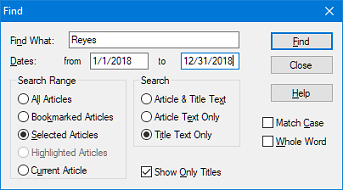
If I need to find photos of something that I did not make a keyword for, I can usually at least recall the location. So first I search on the location with the Title Text Only option, and then follow that with a search on the full Article & Title Text across the reduced Search Range of Selected Articles.
Very rarely do I need to run a full search on both Article & Title Text with a Search Range of All Articles.
I hope this gives you some ideas for searching your Knowbase files more effectively.
Search Site
Recent Posts
About
Personal Knowbase is a note management program for Windows. Organize free-form text information using keywords.
To see if Personal Knowbase is right for you, please download a fully-functional 30-day software trial.
Tags
attachments backup clipboard dates documentation education export files find formatting getting started import information management installation interface keywords network PK Reader portability print query registration reports research security settings site info small business support time management upgrade Windows writers
