
PK Tip: Combining Multiple Articles into One Article
If you need to merge the information from several Personal Knowbase articles into a single article, you can do this:
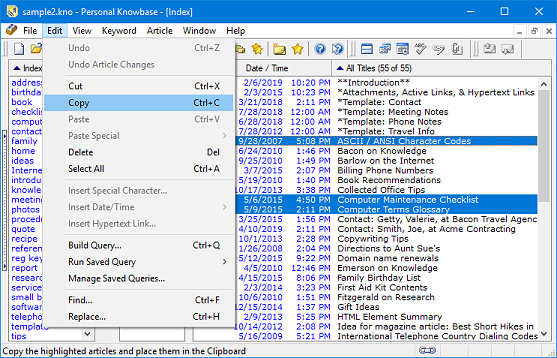
From the Titles column in the Index Window, highlight the titles of the articles you want to combine.
To highlight multiple consecutive or non-consecutive article titles, see our PK Tip for Selecting Multiple Items in a List
Use the Copy command (or the shortcut Ctrl+c) to copy them to the Clipboard.
Place the mouse cursor into the content area of the new, empty article.
If you haven't yet created a new article, use the New Article command from the Article menu.
Use the Paste command (or the shortcut Ctrl+v) to insert the text from the Clipboard.
This pastes all the previously highlighted articles into the new article's content area. Note that since the entire articles were copied, you will also get title, date, keyword, and attachment information at the top of each article's text.
The old copies of the articles still exist. If you want to remove those articles from your data file, you can then delete them. To do that, highlight all of the titles as described in the first step above, then press the Del key. PK will prompt you to verify that you want to delete them.
Search Site
Recent Posts
About
Personal Knowbase is a note management program for Windows. Organize free-form text information using keywords.
To see if Personal Knowbase is right for you, please download a fully-functional 30-day software trial.
Tags
attachments backup clipboard dates documentation education export files find formatting getting started import information management installation interface keywords network PK Reader portability print query registration reports research security settings site info small business support time management upgrade Windows writers
