
Creating a Writer's Idea Bank with Personal Knowbase
Do you have more ideas than you know what to do with? A common problem for writers is that new ideas occur when you're already involved with a work-in-progress (WIP). Rather than distracting yourself with each shiny new inspiration, bank your ideas away for later. Rest assured knowing that you've stored the new idea safely and can get back to your WIP without losing your creative flow.
Personal Knowbase is a great software option for saving your ideas.
For general tips about making and using an idea file, see our previous post on keeping an idea dump with Personal Knowbase. Here are some additional tips specifically for writers.
How to Build an Idea Bank
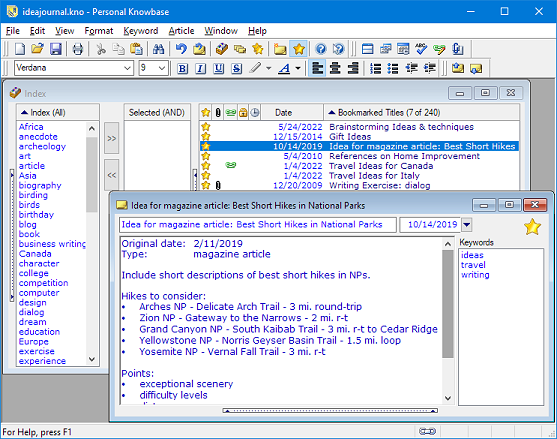
Create a Personal Knowbase data file to collect your ideas. Create a PK article for each idea or topic. That article is a "bucket" for all your notes related to that idea.
Capture anything that catches your interest in an imaginative way. For example, you might include a link to a blog post that gets you thinking about an aspect of character development.
Include items such as:
- ideas for books, essays, stories, posts, poems
- character descriptions from people you see or imagine
- character name possibilities
- snatches of dialogue you hear that strike you
- story, article, and post fragments you started and stalled
- snippets you jotted down while inspired
- results of writing exercises
- writing prompts that catch your attention
What Keywords to Use
As you add articles to your PK file, select keywords for each by thinking about how you're likely to want to locate that idea later.
Here are some types of attributes that make useful keywords:
- category of writing that you could develop from the idea (short story, script, blog post, technical writing, etc.)
- genre, if you tend toward variable inspirations (mystery, romance, adventure, etc.)
- nature of the snippet (anecdote, dialogue, tips, examples, etc.)
- aspect of writing (character, setting, time period, etc.)
- subjects (auto, travel, nature, sports, etc.)
- sources (Internet, books, dreams, observations, etc.)
If you use the advanced Personal Knowbase feature of Keyword Groups, consider making a Group for each type of keywords that you use.
How to Organize Your Ideas
You may find it useful to record all short items about a single topic into a single article. For example, if you're collecting ideas for travel writing, you may put all thoughts about Italy into one article and thoughts about China into another.
Ideas that you've developed more warrant their own articles. These can be associated with other articles by giving them the same keywords. For example, if you have several short ideas about widgets, you could just create an article titled Widget notes. But once you have ideas about widget settings and widget characters and widget scenes, consider splitting them into separate articles for each subtopic. Assign the keyword widget to all widget-related articles.
You may feel an impulse to weed out your data out of concern that too many ideas will be more difficult to manage and organize. Although too many ideas may be a problem when storing them in physical notebooks or flat text files on your computer, you'll find that this isn't a problem using software like Personal Knowbase. Since you index your ideas in PK by keywords, you never need to look at them all at once, and you can easily pare down your list to the specific types of entries that you are looking for.
How to Use Your Bank
 Three situations to use your idea bank are when you need something new to work on, when you're developing a topic, or just to work your subconscious for more ideas.
When you need something new to work on, browse your file to see what fits your current needs (for example, book, story, or blog post) and sparks your interest.
After you've started a project, check your bank for related ideas. You may have already captured enough material to develop an entire feature or story. Ready to write that piece on Italy? Pull up everything you have for the keyword Italy.
If your current WIP gets stuck, try churning up your creative juices with one of the shiny new ideas that you stored away. When you're having trouble getting your thoughts together or suffering from writer's block, fall back to browsing your file to spark new ideas and get you moving again.
When you review old undeveloped ideas, new details may occur to you. Add them to that idea's article (for example, a character may become clearer in your mind).
Browse your bank in an unorderly fashion to spark new connections. Look for related keywords and articles. Spark your imagination by juxtaposing various items. Two ideas may bounce off each other and combine to form something better. When you find a combination that interests you, associate the two corresponding Knowbase articles using hypertext links or with shared keywords.
Use your idea bank to feed your subconscious and enhance your writing. Capture your ideas and watch them evolve.
Search Site
Recent Posts
About
Personal Knowbase is a note management program for Windows. Organize free-form text information using keywords.
To see if Personal Knowbase is right for you, please download a fully-functional 30-day software trial.
Tags
attachments backup clipboard dates documentation education export files find formatting getting started import information management installation interface keywords network PK Reader portability print query registration reports research security settings site info small business support time management upgrade Windows writers
