
PK Tip: Using Relative File Link Locations in Portable Mode
When you move your Personal Knowbase notes between computers using the software's portability feature with a USB thumb drive or other removable media, the drive letter of the removable drive can vary from one computer to another. If you use absolute path names for the targets of file links and attachments, the links may become incorrect.
Using Relative Paths for your links helps PK find files which are the targets of attachments and hypertext links when running in portable mode. In short, you can tell PK to look for attached and linked files in a location relative to the location of your Knowbase (*.KNO) file instead of specifying a full, absolute path.
To do this, open your Knowbase data file, then access the File Properties from the File menu. Go to the Articles tab. In the section Locations for Targets of Relative Links, select the option Use current file's location. Uncheck the checkbox for Save full pathnames for new file or folder targets. This tells PK that, unless you specify a full, absolute path for a file link, it should look for the linked file in a path relative to the main data file's location and therefore on the USB drive.
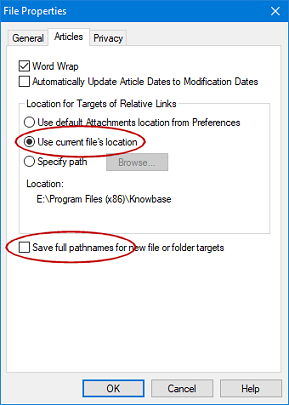
For information about using Relative Paths in this way, see the Help topic for Linking to Files Relative to the Data File's Location.
Because this setting is in File Properties, it affects only the current data file. If you have multiple data files on your USB drive and want to use this method of locating link targets for all files, you must set this setting in the File Properties of each file individually.
Important: Change these settings before creating your links, since the settings affect the storage of pathnames for new file targets. Existing links were stored with the settings that existed when the links were created. To make old links not store the full pathnames, you can re-specify the links again after changing the settings.
Search Site
Recent Posts
About
Personal Knowbase is a note management program for Windows. Organize free-form text information using keywords.
To see if Personal Knowbase is right for you, please download a fully-functional 30-day software trial.
Tags
attachments backup clipboard dates documentation education export files find formatting getting started import information management installation interface keywords network PK Reader portability print query registration reports research security settings site info small business support time management upgrade Windows writers
