
PK Tip: Finding Articles Related to an Entire Keyword Group
Taken literally, keyword groups contain keywords, not articles. However, you can easily locate all articles which are associated with any keywords which are members of an entire keyword group.
For example, say you have a data file for recipes with a keyword group "courses". The group "courses" has member keywords such as appetizer, salad, and dessert. You want all recipe articles with any of these "courses" keywords assigned to them.
To find all articles related to any member keywords of a group:
Use the Build Query command from the Edit menu (or use the Build Query button on the Tools Toolbar).
In the Build Query dialog box, click on the Keyword Group button.
From the resulting dialog box, select the keyword group that you want. This creates a query with the operand GROUP: plus the name of your selected group.
Click OK to run the query.
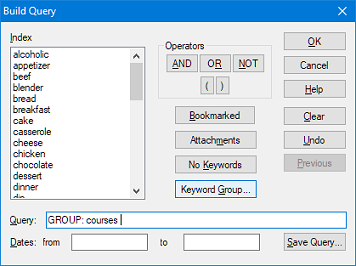
The resulting list of articles in the Index Window includes only articles with at least one keyword from that group assigned to it.
Search Site
Recent Posts
About
Personal Knowbase is a note management program for Windows. Organize free-form text information using keywords.
To see if Personal Knowbase is right for you, please download a fully-functional 30-day software trial.
Tags
attachments backup clipboard dates documentation education export files find formatting getting started import information management installation interface keywords network PK Reader portability print query registration reports research security settings site info small business support time management upgrade Windows writers
