


Personal Knowbase®
4.1
What is Personal Knowbase?
Can't find your critical notes when you need them? Whether you're archiving email messages, organizing your research notes, or just trying to get rid of all those bits of paper on your desk... Personal Knowbase can help.
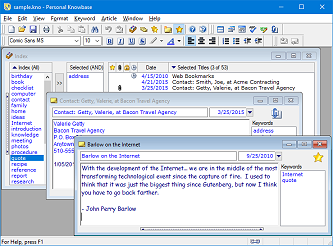
Personal Knowbase is a program for organizing free-form information using keywords. Build a personal knowledge base of all your notes, messages, and ideas. Store and index your information in one place for easy retrieval using keywords that you choose. The attachment feature even associates disk files and Internet addresses with your notes, so you can access any computerized information using the same set of keywords.
» Reduce paper clutter.
» Save hard disk space by consolidating small text files.
» Gather related information together.
» Find your information easily.
» Protect your private information with passwords.
» Cross-reference your notes with hypertext links.
Why use keywords?
Indexing with keywords sets Personal Knowbase apart from other free-form database software. Remember, it doesn't matter how easily you can store information if you can't find it.
Software that provides only string searches isn't enough. Even a complete text search on any variation of “motherhood” won't locate a great quote like “The hand that rocks the cradle rules the world.” And with larger databases, searches often find many irrelevant results. Using keywords, you can find information easily by association.
Software that categorizes your notes into categories isn't enough. Does a note on books about national parks go under the Books category or the Travel category? The answer is both! Using keywords, you can cross reference your notes with as many keywords as you need.
Index your notes!
Information is power, but it's useless if you can't access it. Conquer information overload! Find that critical information when you need it!
 Only $49.95 (USD)
 Download a risk-free trial version now!
Features
- Record text information in articles of any size.
- Store any number of articles.
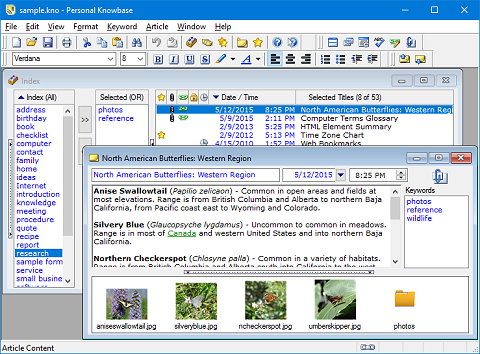
- Quickly access related information by tagging with keywords.
- Bookmark commonly used articles for instant reference.
- Create hypertext links to files, web addresses, and other Knowbase articles.
- Attach files or web addresses to articles.
- View thumbnails of image attachments with article text.
- Password-protect your articles and data files.
- Pop up reminders at a specified date and time.
- Combine keywords with operators such as AND, OR, and NOT.
- Drag in any block of text to create a new article.
- Import information from text, HTML, RTF, Cardfile, delimited text, and custom formatted text files.
- Export information to text, HTML, RTF, Cardfile, and CSV files.
- Generate reports about keywords and articles.
- Search and sort by the article dates.
- Search for and replace text strings.
- Spell-check article text.
- Install Personal Knowbase on a portable device, such as a USB drive.
- Get started with a detailed tutorial.
Suggested Uses
- Collection of tips and notes.
- Logs and records.
- Web clippings.
- Capture and index of ideas.
- Research notes.
- Free-format PIM for addresses, phone numbers, and email.
- Reference index for books, magazines, and other resources.
- Date-based tickler files.
- Cardfile software replacement.
- Archive for your email messages.
- Knowledge management and Lessons Learned.
- Reference manager program.
- Writer's notes and ideas.
- To-do and reminder lists.
- Meeting notes.
- Telephone conversation notes.
- Bug report database.
- Help desk.
- FAQs.
- Journals.
- Household inventory.
- Recipes.
- Hobby and collection notes.
- Travel info.
- Games tips and hints.
- Simple document management.
- Anything at all that you want to remember...
“Knowledge is of two kinds. We know a subject ourselves, or we know where we can find information upon it.”
~ Samuel Johnson, 1775

